 This is a follow-up to my article on HDTV screen resolution vs a persons ability to perceive any advantage. Before the link to the test pattern, I want to make it clear that the results vary greatly with the content. With an anti-aliased image (i.e. a photograph of a person with many color gradients), it would be much more difficult to detect a single pixel. With a non-anti-aliased image (solid single-color lines), pixels become much more apparent.
To allow everyone to conduct a simple test for themselves, I created a sample a page that is half-way in between the scenarios described above. It is a pixel-by-pixel black and white checkerboard background covering the entire page. When you are very close to the screen, you can tell it is 1-pixel by 1-pixel black & white checkerboard. Farther away, it looks like a gray box. The idea is that you find the distance at which it looks like a gray box, and that is the visual acuity viewing distance for your display.
Disclaimer: this test page is designed to work only on an LCD monitor with pixel-perfect rendering. In other words, the LCD monitor must be running at its native resolution. If you have an analog LCD or a CRT monitor, this test will not work. If it works, you’ll see a page entirely covered with an extremely tiny pixel-by-pixel checkerboard. If it doesn’t work on your monitor, you’ll see a wavy red-green-blue shifting pattern that it totally useless.
Here is the link to the pixel-by-pixel test pattern for LCD monitors:
https://carltonbale.com/pixel_by_pixel_checkerboard/
Determining your Visual Acuity Viewing Distance: The point at which you stop seeing a black and white checkerboard and see instead a gray box is the visual acuity viewing distance for your LCD monitor and your eyeball.
So, what is your visual acuity viewing distance? I’m interested to see the results others get. Please include the following in your comment:
- Your LCD monitor native resolution
- Your screen size (diagonal)
- Your Visual Acuity Viewing Distance
Here is some high-magnification photographic proof that this is a perfect pixel-by-pixel checkerboard (at least on my monitor).
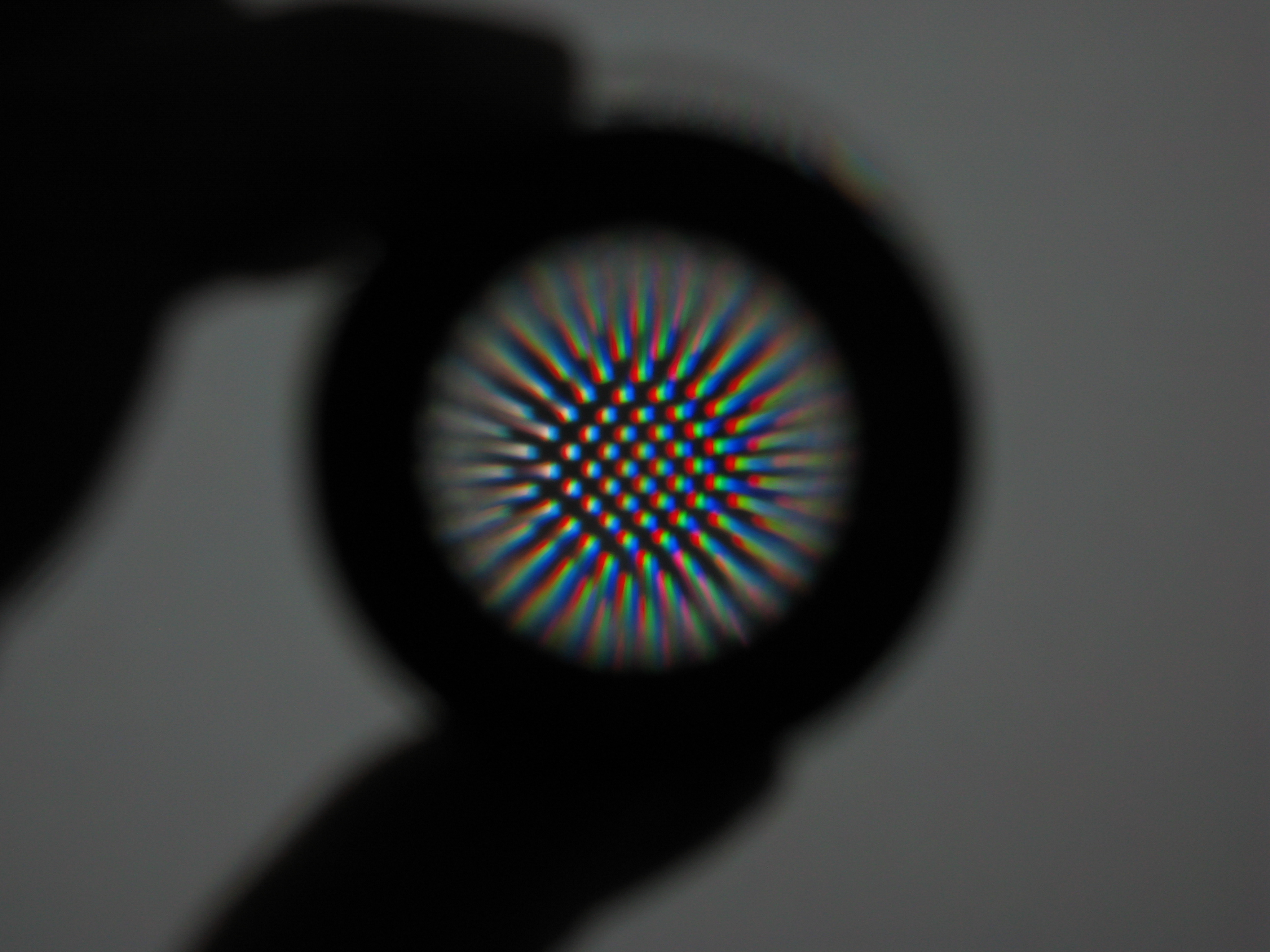
Sadly, with my less than perfect vision, the checkers go solid gray at about 3 feet. With glasses, maybe 5 feet. 24″ 1920×1200 LCD. There’s clearly some interestinng processing happening in my brain, however, as when I’m staring at the center of the image it goes gray at very short distances. If I stare at the bottom corner of the screen I can detech the checkers at much greater distances.
Mark, thanks for the feedback. The calculation I used predicts a visual acuity distance of 36.4 inches for your display, so your results roughly correspond to the generalized rule. It is interesting how the pattern can start to play tricks on your eyes and it start to look like one of those 3-D Magic Eye pictures.
Without glasses, 6′ but corrected to 20/10 (I just had an eye test and got glasses), nearly 9’to 10′ before the pattern was not clear. 19″ LCD monitor at 1024×768.
20″-25″ on a 17″ Flatron 1720 screen.
native resolution: 1280×1024 (sxga)
17″ HP vs17 at 1280×1024
Turns gray at about 2.5-3 feet. A little farther away than I normally sit. I think I may move the monitor back to the back of my desk.
Carlton, I found your site by mitake, and it is fantastic. How in the world do you have time to do all of this with your work and life? No kids I assume? Thanks for the great work.
John: Thanks for the kind comment. Basically, once I figure out something, I put it on my website so I don’t forget it!
I have found many different ‘LCD tests’, most include this same type of test.
Yet yours gives an excellent explanation of how/why the visual acuity works. (For the record, I’m using an old Apple Studio Display, 15″ 1024×768, and the distance is just about two feet for me.)
But, I do want to say that your disclaimer that it doesn’t work on analog LCDs is incorrect. It doesn’t work on UNTUNED analog LCDs. But, if you’re an insane stickler for perfection like myself, and spent half an hour manually calibrating the display, it works fine.
Here’s more data for your validation
Screen Resolution: 1440×900 pxls
Screen Size (Diagonal): 15-3/8 (39.05 cm.)
Viewing distance: 32-5/8″ (82.85 cm.)
Interesting application of the Modulation Transfer Function. Thanx,
Carlton,
First of all, love your blog! I just found it while researching all this HD stuff for a client.
He wants a 46″ Flat Panel HDTV to double as a display for his laptop to show PP shows, charts and graphs etc. in his conference room. I am trying to find out exactly what to recommend to him and have not found anything on this subject that seems to answer my questions. Can you point me in the right direction?
Also, my 14.1″ LCD with “Truebright” has a viewing distance the length of my arms! But it could be that since my uncorrected vision is 20/400 that my glasses impact this. I have extreme astigmatism and even have custom ground lenses to help, but alas…now I know I cannot see very well!
IIyama ProLite E481S 19″ @ 1280×1024 native resolution.
Using the checkboard, the visual acuity checkboard should be around 75 cm, wich is about 2,5 feet.
The comment about the center of the eye going gray at a short distance and peripheral vision going gray much farther out is due to the structure of the human eye. The center is composed of more cones/color receptors while the periphery is composed of more rods/dark and light receptors. The rods are faster and more sensitive. This adaptation is what makes movement in the corner of your eye so noticeable so as to warn you of potential predators/prey.
On another note, although this test is useless as a visual acuity test for my analog CRT, it was very useful for calibrating the moire setting, moire of course being the red-green-blue stripey pattern. I now have have a pretty darn homogenous gray, but that still doesn’t help me with the acuity test.
17″ monitor, 1280×1024 – 35″
When I changed to 1024×768, the pixels looked HUGE…. 80″ on that resolution. So with only 1.7x the pixels, the view distance increased by over 2.25x. I have no idea what that means from a technical standpoint, but I find it interesting anyway.
Why do you persist in perpetuating this misconception?
You don’t ‘see’ with your eyes, you ‘see’ with your brain. The eye is simply an optical interface. The only time the eye’s resolution would limit the amount of detail you percieve (or ‘see’) would be if you kept your eyes fixed on one point of the screen – a highly unlikely scenario with actual pictures.
Have you noticed that although the main area of this pattern blurs and goes grey as you increase your distance you can still perceive the edge as jaggy?
24″ at 1920×1200, about 5′ = 60″ before I start seeing more uniform gray.
I’ve been reading your info on viewing distances and resolution as i’m planning on buying a 40″ 1080p TV soon, and based on your graphs etc i think i made the right decision as i’ll be viewing at a max distance of 8 feet.
As to this test, i’m using a 17″ display at 1280×1024. At upto 3 feet, i can see that the image is not a flat colour, though i wouldn’t go as far as to say that at 3 feet i can see the individual pixels! If the image was moving, then i doubt it would be noticable, but may look poorer than a flat colour moving image in an “undecernable” way. At 3 feet i can still see jagged edges around the edge of the image, and interestingly, where there are small portions of the image visible (i have a dock at the bottom of my screen with icons that overlay my browser) between other images, the fact it is a checkerboard is more noticable than in the centre of the screen where there is no other reference for my eyes.
Once i move back to a 4 foot viewing distance, the image does look totally flat, with no apparent checkerboard at all.
One person on your previous page noted that the viewing distances in your graphs were the point, not at which a single pixel was visible, but as which you could discern the difference between 1 pixel and 2 pixels. This would make for another potential test. For example, the guy who found that single white pixels on a black background were visible from further away than single black pixels on a white background would have been better off having an image with a few spots on a contrasting background, some spots of 1 pixel, some spots of 2 pixels (both horizontal and vertical groups for completeness) and testing at which point he could no longer differentiate between the two.
Anyway, thanks for your work and information, i’m feeling much more confident about my choice of HDTV now!
Simon Says, above, alludes to a secondary test with single and double pixels against a contrasting background. This would be the “Rayleigh Limit” of the optical system. The Rayleigh Limit is the point where two points of light cannot be differentiated. It is used in the fields of astronomy and photonics, among others, FWIW.
I have a viewsonic VK2035WM ( 20′)LCD
1680 X 1050
With my glasses on 3 foot
19″
1280×960
I got as far away as I could in my office, about 20 feet and it was still a checkerboard.
What does Visual Acuity Viewing Distance of a monitor mean exactly? I’d be interested to find out.
>> Have you noticed that although the main area of this pattern blurs and goes grey as you increase your distance you can still perceive the edge as jaggy?
This is a very good point made by Badvok. Do you have a response?
I regret being so late with my reply.
The area being used for the test pattern is composed of alternating light and dark pixels. Each pixel has an opposite one in tone above, below, and to each side. Similarly, each pixel has a like one in tone adjacent to each of the four corners.
Edge pixels are not surrounded by neutralizing pixels.
For the edge pixels to appear as a straight, alias-free line would be the “merging point” of the black & white pixels multiplied by the Rayleigh-limit factor (1.22). So, if the test pattern appears grey at some distance, the jaggies begin to disappear at 1.22 times that.
“I might be wrong; but, I’m never in doubt”.
– H Marshall McLuhan
I also have a good point to make: this post is 3 years old.
Yes, it is. What’s your point? There’s nothing time sensitive about it.
I have a 30″ LCD 2560 x 1600. How do I get this to work?
I cant really tell if this at all has a pattern?
I had one of those monitors. The dot pitch is very small on them and it’s difficult to see the pattern. But if you compare it to solid grey, you will notice a slight difference.
Can hardly make out. I can see it pixelate when very close but not sure when the transition happens. Any ideas / thoughts from your prior experience with such a Monitor?
1920×1080 LCD 15,6′. At 6 cm I can start to see pixels.
28 inch 3840 x 2160 my eyes start to loose individual pixels at 1.8 metres (5.9 feet), but I think that’s more a function of aging eyes.
The monitor model is an AOC U2868PQU 4K.
Doing this test made me realise that an OLED display would give better results with higher contrast ratio and more consistent screen brightness over this LED screen.
2560×1440 27″ and itkind of looks like migraine aura and starts to give me one at close, so I can’t really tell.
27″ 1920×1080 LCD TN, distance at which i stop see pixels and see a gray area 105cm 41.3″
aprox 1 feet, 3200×2000, 16 inch monitor