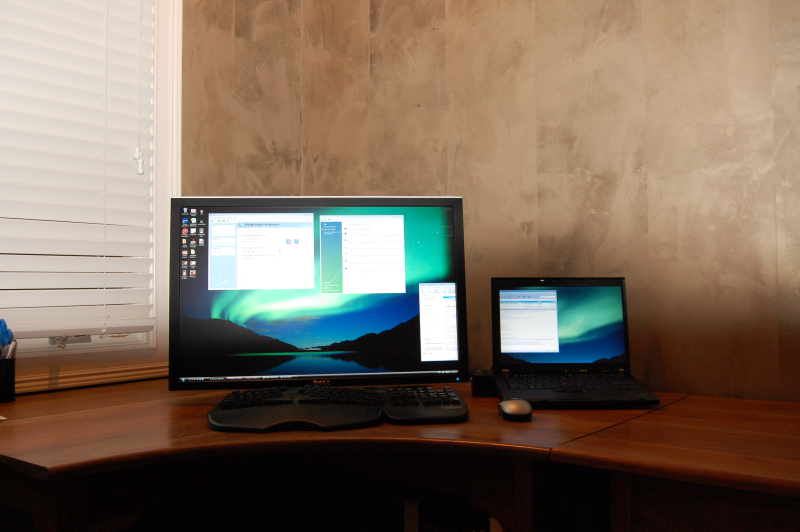
 I received my new Lenovo Thinkpad T61 and I’ve had a couple of days to play around with it. In summary, it is one awesome piece of hardware; this is the best laptop I’ve used. Unfortunately, it’s not perfect. Windows Vista looks beautiful, but it’s pretty slow and unreliable as compared to XP. Also, battery life is shorter than I expected (due to the power hungry nVidia graphics card and maybe due to Vista power management.) Here are the pros and cons:
Pros:
- Keyboard: This keyboard is incredible; it has a great feel to it and the large, white letters on the black keys make them very easy to read. I dislike the keyboard on my Dell D620 even more now and am not overly impressed by the feel of the MacBook Pro keyboard. The ThinkPad keyboard is the best.
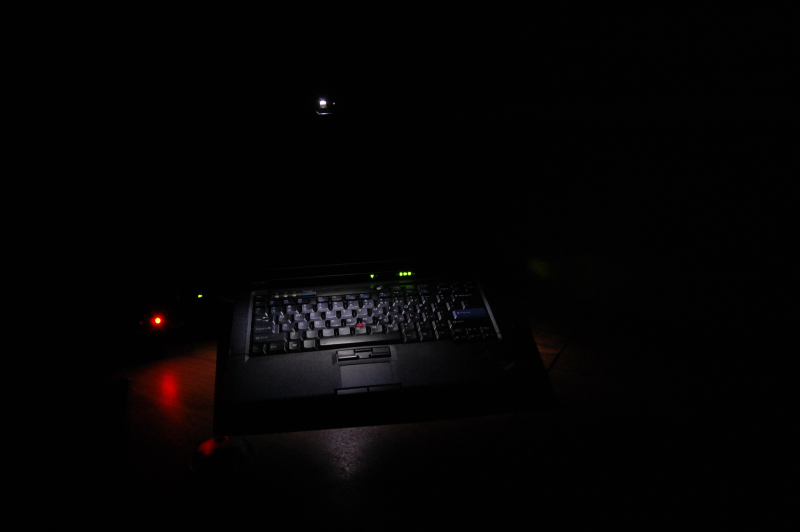
- Think Light keyboard light: I love having a keyboard light! The backlit illuminated keyboard on a MacBook Pro is beautiful and extremely easy on the eyesl. The ThinkPad uses a somewhat crude yet practical approach with a single white LED above the screen that shines down on the keyboard. But when the lights are off, when you occasionally need to hunt for a key, they light works.
- nVidia Quadro NVS 140 Video Card+ Docking Station: runs my 30″ Dell 3007WFP monitor at full resolution (2560×1600) with no problems. That’s exactly what I need. Many laptops can’t address a monitor that requires dual-link DVI; a ThinkPad with an nVidia graphics card can. The higher resolution options were not initially presented through the Windows video control panel; I had to use the nVidia control panel to select the 2560×1600 resolution.
- Also note that DVI dual-link is a single DVI connection using 14 pins (instead of the standard 8 pins.) This allows a single DVI connector to driver high resolution monitors (above approximately 1900×1400 pixels. DVI dual-link is not the same a two DVI connectors for driving 2 monitors — see this wikipedia article.
- Clear WXGA+ Screen: The higher resolution WXGA+ screen is extremely clear and very easy to read. I was concerned that the font may be difficult to read at this high of a pixel density, but it is very sharp and clear using the default Windows settings.
- Fingerprint reader: It has worked flawlessly after I got through the initial print entry. I love how quickly I can now sign-on to Windows; it makes the multi-user feature of Windows pain-free.
- Three raised mouse buttons: I love having 3 mouse buttons and the fact that they are raised above the adjacent surface to make them easier to depress. I absolutely hate the 2 recessed trackpoint button on my Dell D620; the ThinkPad buttons are perfect.
- Trackpoint: It is very configurable via the Thinkpad utility, so I can add options such as “tap to select”
- Touch Pad: the touch pad is very configurable; the extra options for scrolling, scroll continuation, and corner taps make the touchpad useful, but I still spend most of my time using the TrackPoint.
- Keyboard customization utility: This little utility allows keyboard remapping of both the internal and an external keyboard, so your can initiate the special Fn+F7 to toggle internal/external monitors and any other of the special Functions.
- Lenovo System Update Utility: Automatic updating of drivers and Lenovo software; much better than with any other manufacturer I’ve experienced.
- Build quality: This is one solid laptop. It’s rigid, purposeful, and balanced
- Docking Station: It’s great that there is a docking station available: fast docking for charging, mouse, and monitor.
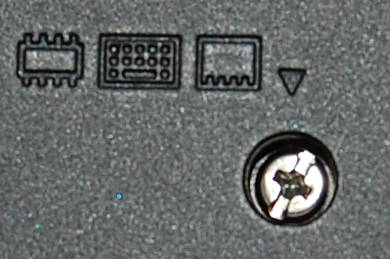
- Easy to Upgrade: I upgraded to 2GB of DDR2 800 (PC2 6400) memory as soon as I unboxed my laptop. Instead of looking for service instructions, I decided to figure it out myself. I flipped over the T61 and each one of the screws that had to be removed to access the memory was labeled with a small icon. I unscrewed each one, the cover popped off, and the memory was right there.

Cons:
- Screen Blanking 6 Seconds after Logon: 6 seconds after I log on or unlock Windows Vista, the screen goes completely blank and then immediately comes back on. This closes the start menu (if I opened it during those first 6 seconds) and also resets the screen brightness to a default level, rather than the level I manually selected prior to the screen locking. This is annoying. Leave the display as it was. Switching back from the logon screen should be completely seamless and it isn’t.
- Weird “Bouncing” Sound from Front Right of ThinkPad: About every 5 minutes or so, I hear a weird sound from the front right of the T61 where the hard drive is located. I pretty sure it’s the hard drive. It sounds similar to a small wooden ball being dropped on a hard surface from about a 1/4-inch height. It’s not loud, but it is persistent and annoying. I’d buy a different hard drive if I knew it would eliminate the sound. It’s not the accelerometer detecting motion and parking the drive heads; I disabled that protection feature and the sound continue to occur.
- Update: This turned out to be a failed Seagate hard drive; it was bad from the start.
- ThinkVantage password manager: It is supposed to allow fingerprint-protected automatic password entry of passwords on websites. But for WordPress, when I go to create a new post on my site, the password manager box pops-up for no apparent reason (that is not prompting for a password.) It seems best to leave password management to Firefox.
- Disk Keeper Slows Everything Down (w/default settings): It is automatically scheduled to defragment the hard drive, which kills the battery and slows the computer. This shouldn’t be the default setting, it’s best to disable this software and run it manually.
- Update: This may have been due to the failed hard drive.
- No Auto-Wake on Lid Open: When I close the lid, Windows can be set to automatically go to sleep (although I have this feature disabled.) What I really want is for the ThinkPad to automatically wake-up when I open the like, the way a MacBook Pro does. Why else would I be opening the lid if I didn’t want to use my computer? Why must I push the power button; can’t it just turn on?
- No DVI-I port on the ThinkPad: There should be a DVI-I port on the ThinkPad instead of the VGA port. DVI-I supports both analog and digital signals, so a small dongle converts it to a standard VGA port. Plus a DVI-I port can drive a digital flat panel monitor (such as my Dell 3007WFP 30″ monitor). Instead, I have to purchase a docking station just to connect to my external monitor. I would have purchased the docking station anyway, but I shouldn’t be required to do so.
- Windows Vista stability and Issues: I initially had problems, but after I installed all of the updates and rebooted, there have been much fewer problems. Unfortunately, ShutterFly software and the ShutterFly Firefox plug-in both crash on Vista (not XP.) Also, the power save feature doesn’t work properly — it’s set to sleep after 10 minutes, but it stays on until the battery is dead. When the screen is deactivated due to the power save feature and it reactivated, it goes to a default brightness level, not the one I had manually set 20 seconds before the screen momentarily powered down.
- Update: After installing the new hard drive and performing a clean install of Windows Vista Ultimate, I’ve had zero problems with Windows Vista!
- I ordered a CD burner instead of a DVD burner: I figured I’d save $50 and burn DVDs on my desktop PC if I needed to do so. But when I was burning 8 CDs to create the backup media, I knew I’d made a mistake. When I downloaded a 1 GB iso file that needed to be burned to a DVD, I was positive I made a mistake. I should have gotten the DVD+CD burner instead of the CD-only burner.
- Tiny Touchpad: The touch pad is absolutely tiny. It should be 4 times the size that it is. And it should have 2-finger scroll.
- Unresponsive Trackpoint: The trackpoint isn’t as sensitive as it is on previous Thinkpads or on my Dell laptop. It seems that I have to push too hard and it still moves too slowly, even with the configuration app in control panel set to the most sensitive settings.
Other Application-specific thoughts:
I tried using Microsoft Internet Explorer and Microsoft Outlook since they are the default Windows programs; I wanted to avoid additional installs. Outlook was unbearably slow syncing with my IMAP server. After an hour of frustration, I installed Thunderbird and all is well. I fared better with IE, but the lack of search-while-you-type finally broke my resolve, and I then installed Firefox. The customization and add-ons make Thunderbird and Firefox almost impossible to beat for anyone who is obsessive about details.
My favorite Windows Vista feature: Start Search. Press the Windows key, start typing the name of the application, and it is automatically selected. I still think Launchy is better, but I could live with only Start Search if I had to.
Great Review. What type of docking station do you have for this setup and where did you purchase it? Thanks.
I have the ThinkPad Advanced Mini Dock. I purchased it from Lenovo because I had several coupons/discount, but it turns out they only applied to the laptop itself, not the dock. I’d recommend purchasing it from one of the many online retailers offering it for a lower price.
I have a new t61 laptop and it does not want to logoff, restart or shutdown. It just stays in windows. It does not shutdown. What is wrong with my laptop.
The Rescue & Recovery Data Backup is taking up too much space on my hard drive so I would like to remove it and backup to an external drive but I can’t find the backup file. I have shown hidden files and did a custom search but can’t find it. It’s 25GB so it should be easy to find. Any ideas?
Jake: I think that is all stored on as hidden, protected file. You’ll need to uninstall the software to get the backup space reclaimed. There is also a 6GB recovery partition; use a program with Gparted (free / open source) or Partition Magic (commercial) to delete the recovery partition and resize the existing windows partition. A bunch of file are included in c:swtools. Create your recover media then delete this directory.
Really, your best bet is to completely reinstall Windows: http://forum.notebookreview.com/showthread.php?t=144783
Like Norman Papagayo, in his comment #43, my T60 also would not restart, shut down, or log off. It would just continue as if I’d never requested it to do so.
I fixed it as follows:
1. Went to the Lenovo website and downloaded the latest driver updates. I did it the ‘easy’ way by letting Lenovo ‘discover’ the model, etc. I did not select individual drivers, but let it put on today’s selections. It did ask for, and I permitted it, to remove the older Restore and Recovery drivers.
It then asked to to a reboot, but still would not reboot, so I held the power button down for 5 seconds. I then powered it up and waited about five minutes until the HD activity ceased.
I then went into Control Panel – Power Options. Mine was set to be ‘always on’, in AC or in battery, with never any action to be taken with the screen closed, and no time-outs for going into standby or hibernation.
I changed it to a pre-configured setting from the drop down for ‘maximum battery life’. Immediately, the screen went much dimmer – and there are selections you can modify for brightness, in AC vs. Battery.
I then exited the Power Options, went to Start – Shutdown, and (TaDa!) it shut down!
Good luck, and hope this helps.
-Warren
Great review.
I’ve been researching a TP setup with the Dell 30″ LCD, and wanted to know if anyone has a pci-e video card up and running with the Advanced Dock.
There’s a support page that suggests that it works with an ATI X1300 video card on XP, driving 4 monitors from the Dock, which would address John Kiser’s problem.
http://www-307.ibm.com/pc/support/site.wss/MIGR-67464.html
From reading the posts above, it seems some pci-e cards are not compatible due to either a) Vista driver issues or b) possibly power consumption of the video card drawing too much power from the Advanced Dock.
I originally wanted an Alienware m15x for lots of good reasons but the selling point was the illuminated keyboard with color change feature. Unfortunately after running a test customization of that model I realized $3373.00 was outrageous for a laptop. So it’s nice that IBM includes a keyboard light; it’s less aesthetic but it does the job. I have an old IBM T30 1.8GHz (single-core) that works extremely well and still looks brand new so I am planning to get the T61p. I love the options that are available in the customization section, especially the WUXGA (1920 resolution!) My 24″ Widescreen LCD monitor runs at that resolution. My only disapointment with the T61p is that there’s no built-in webcam. I originally looked at the R61 model because of the builtin webcam but that model doesn’t support WUXGA so I’m leaning more towards the T61p. My one other beef about the Thinkpads in the placement of the FN (function) key. I use a desktop keyboard so often that I expect the CTRL (control) key to be in the corner. I don’t see why they couldn’t swap the two like Sony does with their VAIOs. All in all Thinkpads are top of the line systems. *If anyone is currently looking to buy a Thinkpad, they’re offering upto 25% off right now and if you search google you can get an eCoupon for another 10% off.
I have a T61 with nVidia Quadro NVS 140M, one mini dock station with both DVI and VGS ports. I also have two external LCD 20″ monitors. I wonder if I can set it up to use all three displays, one builtin laptop display and two extern LCD monitos. I want to show differnt application windows on three different displays, eg., MS outlook on Laptop display, Web broswer on LCD monitor 1 and MS word on LCD monitor 2.
You can connect 1 monitor to the DVI port, one to the VGA port, and use the internal display as well. Otherwise, get the Advanced Mini-dock and the appropriate video card and you can connect to multiple monitors that way. See the comments for details.
Lindeg. Do not get a PCI-express graphics card. They do not work with the ThinkPad with nVidia graphics. Please check the history on this thread and you will see. The only card which works in the Advanced Dock is a Lenovo ATI card. The internal Thinkpad graphics card is nVidia. With Windows Vista you cannot use simultaneous graphics cards unless they use the same driver. Do not make the mistake I did by purchasing the Advanced Dock for use with a PCIe graphics card. I have tried three different cards and none worked. The best you can do is to hook up two external monitors through the dock’s DVI and VGA connections.
John: Thanks for the feedback. I was thinking that someone got the Advanced Mini-Dock working with some help from Lenovo. I guess I got that wrong.
No problem. It’s partially a Vista issue, because of the graphics driver requirements. But I was never able to find a graphics card that would actually work in my Dock. They always crashed the computer, or would not even allow it to boot in the first place. After my complaints, Lenovo updated the documentation for the Advanced Dock. They now say the only card which works is their Lenovo ATI card. And they also say that the only way to run 4 monitors is with Win XP. This is their acknowledgement of the Vista issue, effectively.
I have the Advanced dock and T61p. I was curious if anyone tried an nvidia graphics card since the chipset in the T61p is an nvidia?
Secondly, all the documentation I see mentions the T60p (ATI based). Has anyone actually got the T61p (nvidia) working with lenovo’s (ATI) card = 4 monitors or is that just the T60p (ATI) that works with 4? (Realizing they recommend XP).
Any luck?
I just received a T-61 with a t-9500 and the nvidia 140. I purchased the upgraded screen, The
15.4 WSXGA+ TFT,
and this is my problem. It looks horrible to me. Am I missing something. I lowered the resolution to 1400 by 1050 to enlarge it to a comfortable view, but of course it still is not great. Off angle viewing is horrible, just slightly off angle. I love everything except what I have to look at. Is there anything I can do?
Respectfully,
David
David: There is nothing that will fix off-axis viewing. But you should never run an LDC panel at any resolution other than the native resolution of the panel. I will make everything difficult to read because fonts and graphics can’t be anti-aliased properly. Run the panel at the native resolution and instead increase the DPI setting (to make fonts & icons bigger) or increase the font size (to make just the fonts bigger.)
Mr. Bale,
Thank you for your help. My screen looks much better.
I have enjoyed your forum here.
Sincerely,
David Mayfield
Hi,
I am a semi-professional photograher and I was planning to connect a high end Eizo CG222 (1680 × 1050 resolutie) or SX2461 (1920 × 1200 resolution) screen trough a advanced mini dock with the DVI connector on my Thinkpad T61 (equipped with Vista Business 64, 14.1 WXGA+ (1440×900) and nVIDIA Quadro NVS 140M).
Now, will it work (I will mainly use it as a mirror of my notebookscreen) at full resolution and quality?
On the nvdia website (http://www.nvidia.com/object/quadro_nvs_notebook_techspecs.html) it is stated that the graphic card only supports 1600×1200 resolution (digital) but higher in analogue.
Can I expect my external monitor to provide the 1920 × 1200 resolution at full quality (digiatl output trough the DVI on the dock) although my thinkpadscreen only gives 1440×900 resolution?
Did you test this (do you also have the same 1440×900 screen as i have?)?
Thanks a lot!
With the Quadro video card, you’ll have no issues driving a 1920×1200 external display through the DVI connector on the dock. My review above states that I’m able to drive a 2560×1600 display.
Hi,
I have received from work a new T61 widescreen with a NVidia Quadro NVS 140M Graphics Card. So far I have to say that I don’t really like it (looks horrible, weird keyboard layout, etc. I hope I get used to that) but my by far biggest problem:
It works fine on the ‘standard’ resolution of 1440×900, but as soon as I change the resolution to for example 1280×800 the image is completely blur and unusuable.
I also tried all other resolutions in the menu and none gives a clear picture. The standard 1440×900 is in my opinion too much for the small screen, I cannot work properly with it without ruining my eyes.
Does anybody have a solution for that? Our IT does not……
Many many thanks in advance!!!!!
Herwig: This issue is not specific to Thinkpads or even laptops; all LCD screens should be run only at their native resolution. If the font size is too small, increase the front size (small->large). If the menus and the fonts are too small, increase the DPI setting. Both of these are standard options in the Windows Control Panel – Display Settings (used the Advanced button to get to DPI setting.) You need admin access to change these settings.
Hello Carlton,
thanks for replying so quickly. I already tried to adjust the font sizes etc, but this first of all looks dreadfull and secondly doesn’t look great on the external screen I use in the office.
I wonder why Lenovo decided to squeeze such a high native resolution in such a small screen, doesn’t seem to make sense to me or am I missing something?
Based on the positive feedback on this machine that you have written above:
What is it that you like so particularly about the keyboard? I personally find it dreadfull, being used to Dell, HP and Compaq: The Ctrl and the Esc keys are completely misplaced, and the buttons for the touchpad are too low/almost on the edge, not allowing for confortable working. The response on the keys is good though, that I have to admit. But honestly, I want my Dell back!
Herwig, I think you’re looking at the pixel density from the wrong perspective. It’s not about fitting more desktop real estate into a given screen size, but rather keeping the desktop the same size and giving more detail to what is being displayed. Think of a 0.25″ tall letter being displayed on a 14″ screen. It will look better if 1,000 pixels are used to draw the letter than if 600 pixels are used. The key is to scale what is displayed by the operating system to use higher pixel density. Adjusting the DPI setting is the best way to do this. Windows XP handles this pretty well, Windows Vista does it even better. Despite all of the anti-Vista talk you hear, I’ve a very positive experience with the features and zero stability problems. (I initially had a failing hard drive – the “weird bouncing sound” – that I incorrectly thought was a Vista-related problem.)
The keyboard feel is exactly the big advantage of the ThinkPad. It has the best feel of any laptop keyboard I’ve used and is a joy for typing even after many hours of continuous use. No keyboard flex, great keystroke feel, perfect amount of key depression effort, etc. I agree that the control key is in a weird location. I think it is actually a better location (not as much finger stretch for ctrl+c, ctrl+v), but I hate that it is different than any other keyboard I use. As for the ESC key, I’ve never had a problem with it – it’s still in the far upper right corner, but I can see that it could take some getting used to.
This echos my similar experience with my new T61 which I’ve only had about two weeks. I also suggest UNINSTALLING Diskeeper Lite, as there is no other way to make that absurd tray icon go away. Instead, create a batch file with “defrag c: -b” and “defrag c: -v” on a separate line, each. Add similar entries for other drives you wish to defrag. Safe the files as “C:Program FilesAutoDefrag.bat”. Next save the following code as “AutoDefrag.vbs” as this will run the defrag silently.
Set WshShell = CreateObject("WScript.Shell")Now you can schedule the AutoDefrag.vbs with Windows’ Scheduled Tasks to run on a frequency of your choice without being interrupted by a command terminal popup. You can also invoke your .bat file anytime to manually run, but you’ll see the popup window.WshShell.Run chr(34) & "C:Program FilesAutoDefrag.bat" & Chr(34), 0
Set WshShell = Nothing
Hi Carlton,
thanks a lot, your hint with the DPI settings helped a lot. Honestly, I have never ever needed that one in the past as all my laptops came to me setup in an eye-friendly way. I still feel that this is more as a patch as a ‘normal’ seeting as it does somewhat make the icons and fonts look strange compared to leaving DPIs at standard size – but I guess that is always the problem you have with scaling. This PC is by the way running on XP, but I agree with you, Vista is not bad at all (I have it at my beloved Dell at home 😉
But in short: Thanks a lot again for saving my eyesight!
Now I just have to learn to live with all the other shortcomings (‘unique’ keyboard, too small touchpad and buttons misplaced, battery sticking out, ugly design, eighties style large (and descentered) frame around the screen, flimsy plasticy feeling, unstable docking station, ……… ) until it dies 🙂
I have an issue to. I have a T61 with the nVidia Quadro NVS 140 video card and a Samnusng 970p monitor. I used it with a desktop computer on dvi. Wokred fine. Now when I plug it in on vga (I have no dvi on my t61) I have a signal issue I think. Everything has a ghost kindof effect.
I’m planning to buy this:
http://www5.pc.ibm.com/cr/products.nsf/$wwwPartnumLookup/_39T4587?open&OpenDocument&epi=web_expressepi=web_express#Compatibility
Will it fix my problem?
Yes, the Dock with a DVI connection will fix the problem.
I have the T61 and am running 2 monitors on my dock (1 on DVI and 1 VGA). My problem is that every time I undock and use the laptop without the dock, I have to reset my display settings and my desktop icons get moved around as well. The same thing happens when I re-dock. Does anyone know how I can get around this?
Thanks,
Mike
Hi,
I’ve been using a T61 for 8 months and for the first two months, the system worked absolutely great. After that, I started having troubles after I get out of the sleep mode.
The system works fine for 5-10 minutes after coming out of the sleep mode, but then it stops from responding. I ran PC Doctor, found a problem in the Hard Drive and got it replaced.
It was fine for a week but the problem persisted. I recently got the fan of the laptop replaced, but still it hangs after I come out of the sleep mode.
I updated my Drivers and BIOS and still am facing the problem.
What can I do to work peacefully with this system?
Thanks,
Deepak.
Great website and review of the T61p. I had an experience getting the Dell 30″ monitor to work properly that some others might benefit from.
I can testify that the Thinkpad T61p with the docking station with DVI output (part #250410U) will drive the 3007EFP monitor correctly.
However, it did take some fiddling around to find out how to get it going correctly. At first, it was very dark most of the time. I tried using the Thinkpad Presentation Director software to set it up, but it could not handle the 2560×1600 resolution. I called Dell and they said that the computer could not run it. I called Lenovo and they even said that the computer could not handle that large a resolution! I then had a tech person from my place of employment come over and he solved it in seconds.
You have to use the NVIDIA Control Panel (it shows when you left click on the desktop). It will recognize the screen right away. You may have to correct the resolution (but at least if provides the correct resolution as an option), and if the color is off, you can correct it under the “Adjust desktop color settings” option — where you can click on “Restore Defaults” in the upper right-hand corner. Since getting it set up correctly, it works like a charm. I have one at home and one at the office, and I can simply close the lid (set to go into Sleep mode), move from one docking station to the other, and open the lid.
I hope that people on other lists get to see this – because this information is hard to find!!
There is another option for those who want to run more than two external monitors. EVGA has a product “UV Plus+” that is a USB VGA display adapter (www.evga.com/uvplus). Each one can run an external VGA monitor and you can run as many of these as you have USB ports on your machine – in addition to the two that you can run on the minidoc!
Great info here but I have a quick question:
I have a T61 with the nvidia NVS140 but my screen is a 15.4″@1680×1050. I also own an advanced mini-dock (the one with the DVI etc but WITHOUT the PCIe slot).
My question is will this setup drive a 2560×1600 screen? The reason I ask is that the T61 you (Carlton) own has a 14″ screen with a lower res. I just wonder if it will work properly before I make the jump and order the Dell 30″.
Mick: Yes, it will work.
I dunno how everyone else seems to be having +ve experiences with the T61. Perhaps I have some installation quirks. Often when I take the running T61 off the ac-power, it plain hangs—becoming unresponsive and responding to only a hard reboot. Finally, today that happened one times too many, and now the laptop refuses to start up at all — despite having performed a system restore via the pre-installed ThinkVantage utility. I am surprised to observe such behavior from a thinkpad, and dont know if it is the Thinkpad or the Vista professional on top which killed everything. However, I think it is about time that I went over to the Macs….
It sounds like you have a failed or failing hard drive to me. I’ve had zero problems since performing a clean install of Vista; not sure that I’d recommend the system restore reinstall as you still may get some programs you don’t want. Or you could just perform a clean install of Windows 7 beta; free download from Microsoft.
I’ve been reading through the comments and am now confused… I have a Thinkpad T61P with the Advanced Dock (PCI-E). The internal video chipset is the NVidia Quadro FX 570M. I currently have 2 external 22″ LCD’s connected to the dock’s DVI and Analog connectors. What video card will work to allow me to either connect another external LCD or at least use the internal LCD with the existing LCD’s? Are there multiple options or just one? Thanks!
Jeff, I’m not aware of any method to display 3 screens at the same time using any of the available integrated video cards. Brian Flay above suggests the following:
EVGA has a product “UV Plus+” that is a USB VGA display adapter (www.evga.com/uvplus); you can have as many displays as you do USB ports.
Hi Jeff,
I use a Quadro FX 570 card in the PCI-E slot. I’m using vista ultimate. I can use the built in LCD and have 3 external LCD’s. I’m sure I could put one more on. Biggest problem I have is every reboot I have to reset the position of my monitors.
Good-luck
Steve
I am running XP Pro. I know I’ve read somewhere on the web that people are doing this successfully with XP. I think it’s with an ATI chipset. Thanks.
@ Jeff Clark. Using the pass through connectors on the advanced dock + using a low profile graphics card for even more monitors? Pics explain it better than I could:
www-307.ibm.com/pc/support/site.wss/MIGR-68889.html
I looked into it a while back but was put off by reports of the dock having a really noisy fan.