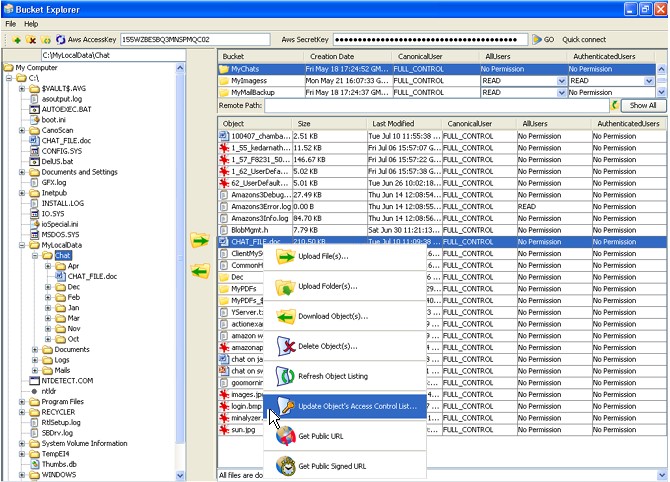
 I’ve tried several different Amazon S3 file managers and had settled on the free S3 Firefox Organizer. But then I tried Bucket Explorer. Not only did it do everything I needed it to do, it introduced to me new features I didn’t know Amazon S3 supported. If you’re like me, you love free and open source software. Bucket Explorer, once out of beta, will be a commercial program. I’m not sure what the final price will be, but assuming it costs less than $40, it is a program worth purchasing. Here’s why I’m recommending it.
Bucket Explorer is a Java-based GUI for managing, uploading to, and downloading from buckets on Amazon S3. It is not designed to backup local computers (Jungle Disk and S3 Backup do this); it’s designed for those sharing and managing web content. So if you plan to use Amazon S3 as a Content Distribution Network, Bucket Explorer is targeted at you. For those not familiar with Amazon S3, the attraction is inexpensive and unlimited storage, inexpensive and unlimited download bandwidth, and ultra-high reliability.
Because it is written in Java, it runs on Windows, Linux, and (currently in private beta) Macintosh. I’m generally skeptical of Java application stability, but I’ve been using it for a few weeks and it has been 100% reliable. It includes the basic features you’d expect, such as bucket creation and access control list modification (for public sharing of files.)
What impressed me most about Bucket Explorer is support for advanced features, such as:
- Enable logging for buckets and store logs in a different bucket
- Retrieve the public URL of files
- Temporarily share private files publicly with a link that auto-expires after a specified time
- Create virtual folders within buckets
The more I used Bucket Explorer, the more I learned about the capabilities of Amazon S3. I did identify a few addition features I’d like to see. Here is a summary of my suggestions:
- Refresh local file listing (without switching to one directory and back to the original)
- Ability to rename local files (currently have to do this in Windows Explorer)
- Have the option to auto re-connect to the last bucket on startup (instead of re-entering it each time)
- When right-clicking a file, have the option to copy the torrent address to the clipboard (just like you can with the Public URL)
- I have my own domain pointing to an S3 bucket; it would be nice if these buckets could be flagged to return the custom domain URL instead of the default Amazon URL. Not sure if this “use different URL info” might be a setting stored on the local PC or a config file stored in the bucket itself. Either way, it would be a useful feature to have if you plan on using the custom domain name.
I sent these suggestions to the developers. I wasn’t sure if they’d acknowlege my suggestions or not, but I almost immediately received an e-mail back from them:
THANKS for the feedback. Its the feedback from users which keeps us motivated to work on the product. All of your suggestions are excellent. We collected all the feedback provided till August 30th, and we are trying to release one version with that feedback by end of this month or latest by Monday / Tuesday. Once that release is out for public beta, we will start working on all the change requests that we got in the month of September.
With this type of response, the future of Bucket Explorer appears to be very promising. To see it in use, you can go to their site and view the demo. If you use Amazon S3 for sharing content, I think you’ll want to give it a try. According to a forum post, if you provide them with design/feature feedback during the beta period, you’ll receive a free copy of the initial release.
tag…you’re it. Blame your wife. 🙂
Bucket Explorer works well, although I hope they’ll fix a few things like the left file management pane (disk choice is uneven).
I wanted to add a great choice for MAc OS X users, too: Transmit by Panic software, which is FTP, SFTP and S3 all in one. Has favorites, too. Seems to work very well on my MacBook. On the PC, we use Bucket Explorer of course.
Hi, you should give a try to S3 Webmaster as well: http://www.maluke.com/software/s3-webmaster
It has some features Bucket Explorer lacks and lacks some minor once. It’s very easy to use and very stable and once I add a few more features it will be available to buy for just $20.
You really should look at smestorage.com – as well as providing a great website to to do all sorts of stuff with S3 files they also provide a windows file explorer tool that also offer integration with Microsoft Office and Open office. If you sign up for their OpenS3 beta you can now use your own S3 keys also – awesome product in my opinion and has not cost me a dime !
Everyone should check out S3 Browser (http://s3browser.com)…simple and straight forward and free! It is a 459KB download compared to Bucket Explorer’s 47MB zipped!
Whilst it does not provide all the features of Bucket Explorer it does provide the basics and I have encountered no problems with it. There is also a Pro version available.
Hi, You should have a look at S3 supported FTP tool CrossFTP: http://www.crossftp.com/
It supports schedule, synchronization, lots of FTP protocols, a good tool to have.
If you are on Windows try CloudBerry Explorer for Amazon S3. It makes managing files in S3 EASY http://cloudberrylab.com/ It supports most of the Amazon S3 and CloudFront features and It is a FREEWARE
Have a look to JS3Explorer. It’s an applet that allows managing S3 bucket content, rename, delete, move and copy files. You can also upload and download (with resume support). Finally, you can view and update permissions (ACL).
Homepage: Java S3 Explorer
Online demonstration: S3 Explorer online
I use S3fm, a free online S3 file manager. It’s really nice and convenient. You can use it everywhere, no installation required (plays nicely with Safari too!).
http://s3.amazonaws.com/s3fm/index.html
“S3fm is a stand alone JavaScript application that runs entirely in your browser. The application communicates directly with the Amazon S3 servers and does not share user credentials with any intermediaries or 3rd party web sites.”